Creating a home workspace that is both cozy and functional can significantly improve your productivity and overall well-being. Whether you’re working remotely full time or need a dedicated area for occasional tasks, designing a space that feels comfortable and supports your work needs is essential. In this post, we’ll explore practical tips to help you set up a home workspace that’s inviting, organized, and efficient.
Why a Cozy and Functional Workspace Matters
A workspace that balances comfort and utility helps you focus better and feel more motivated. A cozy environment can reduce stress and fatigue, while functional features ensure you have everything you need within reach. Together, they create an ideal atmosphere for both creativity and efficiency.
Choose the Right Location
Consider Natural Light
Natural light can boost your mood and energy levels. Position your desk near a window if possible, to take advantage of daylight. Avoid placing your screen directly in front of a window to reduce glare.
Minimize Distractions
Select a quiet area away from heavy foot traffic or noisy appliances. If space is limited, use room dividers or noise-cancelling headphones to maintain focus.
Invest in Ergonomic Furniture
Comfortable Chair
An ergonomic chair with adjustable height and lumbar support is crucial to prevent back strain. Look for cushioned seats and breathable fabric to ensure comfort throughout long work hours.
Suitable Desk
Choose a desk with ample surface space for your computer, documents, and other work essentials. Standing desks or adjustable desks are excellent options if you want to alternate between sitting and standing.
Organize Your Workspace Efficiently
Keep Essentials Handy
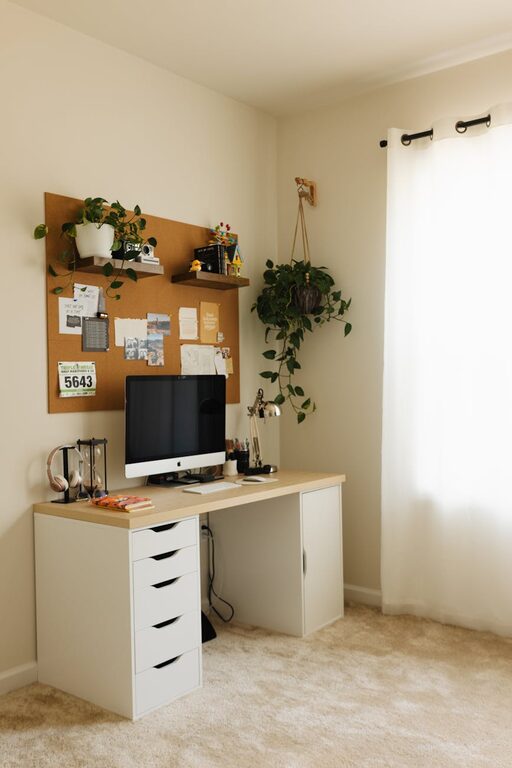
Use desk organizers, trays, or drawers to keep frequently used items like pens, notebooks, and chargers within reach but neatly contained.
Cable Management
Tidy up cables with clips or sleeves to avoid clutter. A clean setup reduces distractions and potential tripping hazards.
Digital Organization
Keep your digital workspace tidy as well. Create folders and labels on your computer to manage files effortlessly.
Add Personal Touches for Warmth
Soft Textiles
Include cushions, a cozy throw blanket, or a small rug to add texture and warmth to your workspace.
Plants
Adding a few low-maintenance plants can improve air quality and create a calming environment.
Artwork and Photos
Display inspiring artwork or personal photos to make your space feel unique and motivating.
Optimize Lighting
Layered Lighting
Use a combination of overhead lights, desk lamps, and natural light to reduce eye strain. Adjustable desk lamps can help focus light exactly where you need it.
Warm Light Bulbs
Choose bulbs with a warm color temperature to create a relaxing ambiance rather than harsh white light.
Manage Noise and Maintain Privacy
Soundproofing
Consider adding soft materials like curtains, rugs, or acoustic panels to absorb sound.
Headphones and White Noise
Noise-cancelling headphones or a white noise machine can help drown out background noise when needed.
Maintain a Clean and Decluttered Space
Daily Tidying
Spend a few minutes each day putting items back in place and wiping surfaces to keep your space pleasant and distraction-free.
Regular Deep Clean
Schedule weekly or monthly cleaning sessions to tackle dust, trash, and deeper organization tasks.
Incorporate Technology Wisely
Reliable Internet Connection
Ensure your workspace is within range of a strong Wi-Fi signal or use an ethernet cable for stability.
Quality Accessories
Invest in a good keyboard, mouse, and monitor to enhance comfort and prevent repetitive strain injuries.
Backup Power
Consider a surge protector or uninterruptible power supply (UPS) to safeguard your devices during outages.
Establish Boundaries and Routine
Set Work Hours
Designate specific times for work and breaks to maintain balance between professional and personal life.
Use Visual Cues
A “work in progress” sign or distinct workspace décor can signal to others when you’re busy and should not be disturbed.
—
By thoughtfully selecting your workspace location, investing in ergonomic furniture, organizing efficiently, and personalizing your area, you can create a home workspace that feels inviting and helps you stay productive. Remember, comfort and functionality go hand in hand, so prioritize both to enjoy a pleasant work environment every day.