
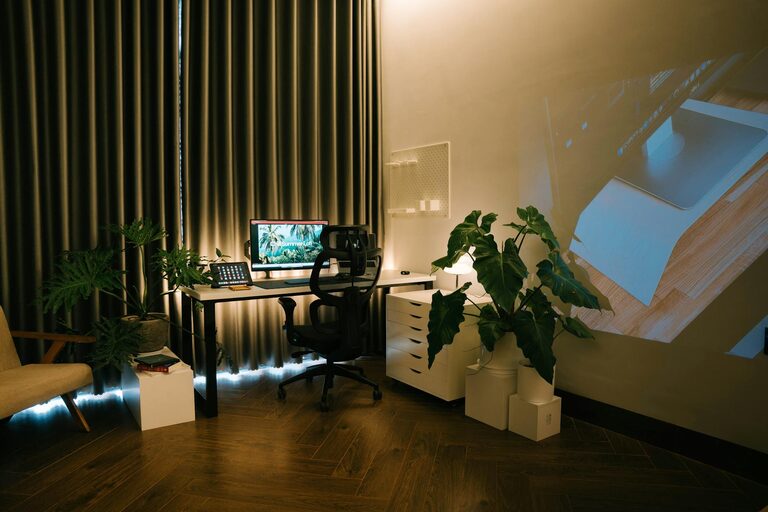
Creating a home workspace that balances productivity with relaxation can significantly improve your work-from-home experience. A well-designed workspace helps you stay focused, reduces stress, and encourages healthy work habits. Whether you’re new to remote work or looking to upgrade your setup, these tips will help you create a comfortable and efficient environment.
1. Choose the Right Location
The foundation of a good home office starts with location. Consider these points:
– Quiet Environment: Select a spot with minimal noise and distractions to maintain concentration.
– Natural Light: Place your desk near a window to benefit from natural light, which can boost mood and reduce eye strain.
– Space Availability: Make sure there’s enough room for your desk, chair, and any equipment or materials you frequently use.
Avoid placing your workspace in high traffic areas or bedrooms where relaxation and work can blur together.
2. Invest in Comfortable Furniture
Comfort is key to staying productive throughout the day.
– Ergonomic Chair: Choose a chair with adjustable height, good lumbar support, and comfortable cushioning.
– Desk Height: Your desk should allow your arms to rest at around 90 degrees when typing.
– Adjustable Accessories: Consider a keyboard tray or monitor stands to reduce strain on your wrists and neck.
Good posture supports your health and helps prevent discomfort that can distract from work.
3. Organize Your Space Efficiently
An organized workspace promotes focus and reduces stress.
– Declutter Regularly: Keep only essentials on your desk.
– Storage Solutions: Use shelves, drawers, or organizers to store documents and supplies.
– Cable Management: Use clips or sleeves to keep cords neat and prevent tangling.
A tidy space can help your mind feel clear and ready to tackle tasks.
4. Personalize Your Workspace
Adding personal touches makes your workspace more inviting and relaxing.
– Plants: Small indoor plants can improve air quality and add a calming natural element.
– Artwork or Photos: Display images or quotes that inspire and motivate you.
– Color Choices: Incorporate colors that promote focus, such as soft blues or greens.
Personalizing your area can make working at home more enjoyable.
5. Control Lighting
Proper lighting reduces eye strain and improves your mood.
– Natural Light: As mentioned, natural daylight is ideal.
– Task Lighting: Use a desk lamp with adjustable brightness for focused work.
– Avoid Glare: Position your monitor to prevent glare from windows or overhead lights.
Adjust lighting depending on the time of day and work type.
6. Minimize Distractions
Creating an environment free from interruptions helps maintain productivity.
– Noise Control: Use noise-canceling headphones or white noise machines if you can’t avoid background noise.
– Set Boundaries: If you live with others, communicate your work hours to reduce interruptions.
– Digital Boundaries: Limit notifications and use apps to block distracting websites if necessary.
A clear boundary between work and rest time keeps you focused.
7. Maintain Good Air Quality
Fresh air helps keep your energy levels up.
– Ventilation: Open windows when possible to circulate fresh air.
– Air Purifiers: Consider a small purifier if your workspace has poor air circulation.
– Humidity: Keep humidity at comfortable levels to prevent dryness or discomfort.
A clean, fresh atmosphere supports your well-being during work hours.
8. Incorporate Movement Breaks
Physical movement helps prevent stiffness and increases alertness.
– Stretch Regularly: Take short breaks to stretch your arms, neck, and back.
– Set Reminders: Use timers or apps to prompt you to stand or walk around every hour.
– Active Sitting Options: Consider a balance ball chair or standing desk for variety.
Moving throughout the day helps reduce stress and keeps you energized.
9. Use Technology Wisely
Technology should support, not hinder, your productivity.
– Reliable Equipment: Invest in quality computers, monitors, and internet connections to prevent technical frustrations.
– Organizational Tools: Use calendars, task managers, or note-taking apps to keep track of work.
– Backup Plans: Regularly save your work and consider cloud storage for easy access.
Well-chosen technology streamlines your workflow.
10. Establish a Daily Routine
A consistent routine signals your brain to switch into work mode.
– Regular Hours: Try to start and finish work at the same time each day.
– Morning Rituals: Create a routine that prepares you mentally, such as coffee or light exercise.
– Wind-Down: Have an end-of-day routine to separate work time from personal time.
Consistency supports concentration and work-life balance.
—
Creating a relaxing and productive home workspace is about blending comfort, functionality, and personal style. With thoughtful setup and habits, your workspace can become a place where you thrive both professionally and mentally. Start small with a few adjustments, and watch your workdays become more enjoyable and effective.